OIDC / SSO Setup Guide¶
How to connect a corporate identity provider (Keycloak, Okta, Azure AD / Entra ID, Google Workspace, GitLab, or any standards-compliant OIDC provider) to the platform, so users can sign in without a platform-specific password.
This is additive: password + TOTP-MFA login keeps working for every org unless you explicitly turn
on "obligatory OIDC" (see §6). See ACCESS_CONTROL.md for the security design behind this feature
(account-linking, JIT provisioning, MFA composition, CSRF/PKCE) — this document is the operational
how-to.
0. Org-scoped or platform-wide — pick one first¶
There are two independent ways to configure OIDC, and most of this guide applies to both — they differ only in who owns the config and what happens to a JIT-provisioned user:
| Org-scoped | Platform-wide | |
|---|---|---|
| Configured via | Organizations → (expand org) → SSO / OIDC tab, or /api/orgs/{org_id}/oidc-providers |
System → SSO tab, or /api/system/oidc-providers |
| Who can configure it | Org owner/admin | platform_admin only |
| Plan gate | Needs the org's sso plan feature |
None |
| JIT-provisioned user lands | In that org, with a role from role mapping/default_role |
In no organization — global role user only; a manager assigns org/team membership afterward |
| "Require SSO" (disable passwords) | Supported, per org | Not exposed — the blast radius of "every user on the platform" needs deliberate design, not a reuse of the per-org toggle |
| Intended shape | Several independent client organizations sharing one instance, each with its own IdP and isolation boundary (MSSP/SaaS) | One company, several internal teams under one org — SSO should just work platform-wide, without registering a separate OAuth client per team |
Use platform-wide if this deployment is one company (the common case) — set it up once, and every new hire signs in with the corporate IdP from day one; someone with org-admin rights sorts them into the right org/team afterward from Organizations. Use org-scoped only if you are actually running this instance for multiple separate client organizations that must stay isolated from each other (an MSSP reselling the platform, for example) — each client configures their own provider, and JIT-provisioned users can never end up in the wrong org's roster.
They can coexist: a user typing an @company.com email on the login screen sees a button for
every enabled provider — org-scoped and platform-wide alike — that matches that domain. Providers
with no email_domain set are catch-alls — "our whole company, any address" — and behave
accordingly: platform-wide catch-alls show on the login screen immediately, org-scoped ones match
any typed email or login. Typing a login without @ works too: the backend maps it to the
user's stored email and matches by its domain, so operators can sign in the way they think.
The rest of this guide describes the org-scoped flow; every field and step is identical for the
platform-wide path except: no default_role/role_mapping/enforced (§5, §8 don't apply), no
plan-feature check, the endpoint base is /api/system/oidc-providers (not
/api/orgs/{org_id}/oidc-providers), and only a platform_admin can call it.
0b. Prerequisites¶
- Org-scoped: you must be owner or admin of the organization (org role, not global role —
see
ACCESS_CONTROL.md's org-role section), and the organization's plan must include thessofeature (team/protiers don't by default;enterprisedoes — an admin can also grantssodirectly viaPATCH /api/marketplace/plans/{org_id}). Without it, provider creation returns403. - Platform-wide: you must be a
platform_admin. No plan check. - Decide
PUBLIC_BASE_URL(env var on the backend) before you register the redirect URI at your IdP — see §1. On a multi-node HA deployment, set the identical value on every app node — seeHA_DEPLOYMENT.md. Otherwise the redirect_uri the platform sends at login time can differ from the one an IdP's callback lands on, depending on which node answers, and OAuth's exact-match requirement onredirect_uribreaks the round trip. - If your IdP is self-hosted on a private/internal network (not reachable from the public
internet), see the
allow_private_issuernote in §3 — the platform's SSRF guard blocks it by default.
1. Set PUBLIC_BASE_URL first¶
The platform builds the OIDC redirect_uri itself — it is never accepted from the browser or
from provider config, by design (closes the open-redirect angle entirely). It is:
If PUBLIC_BASE_URL is unset, the backend falls back to the incoming request's own host, which
works for local testing but is not safe behind a proxy that doesn't strictly control the Host
header. Set it explicitly in production:
Restart the backend after changing it. The create dialog pre-generates the provider id
(§3), so the exact callback URL is visible and copyable while you fill in the form —
register it at the IdP first, then Create. Every provider row also carries its redirect URI
with a copy button, so a re-registration never means hunting for ids.
2. Register the platform as a client at your IdP¶
Generic steps — see the vendor-specific notes below for exact menu names.
- Create a new OIDC / OAuth2 confidential client (not "public"/SPA — the platform holds a
client_secret). - Grant it the Authorization Code grant type. PKCE is always used by the platform in addition to the client secret — if your IdP has a "PKCE required" toggle, turning it on is fine and recommended.
- Scopes:
openid,email,profileat minimum. Add a scope that exposes group/role membership (e.g. Keycloak'sroles, Azure AD'sgroups) if you plan to use role mapping (§5). - You won't have the final redirect URI yet (you need the provider's platform-side
idfirst) — register a placeholder or come back to this step after §3. The URI shape is always:{PUBLIC_BASE_URL}/api/auth/oidc/{provider_id}/callback. - Note the issuer URL, client ID, and client secret — you'll need all three for §3.
The issuer URL is the base that
{issuer}/.well-known/openid-configurationresolves against; for most IdPs this is printed directly on the client/application's overview page.
3. Create the provider on the platform¶
Via the UI: Organizations → (expand your org) → SSO / OIDC tab → + Add Provider.
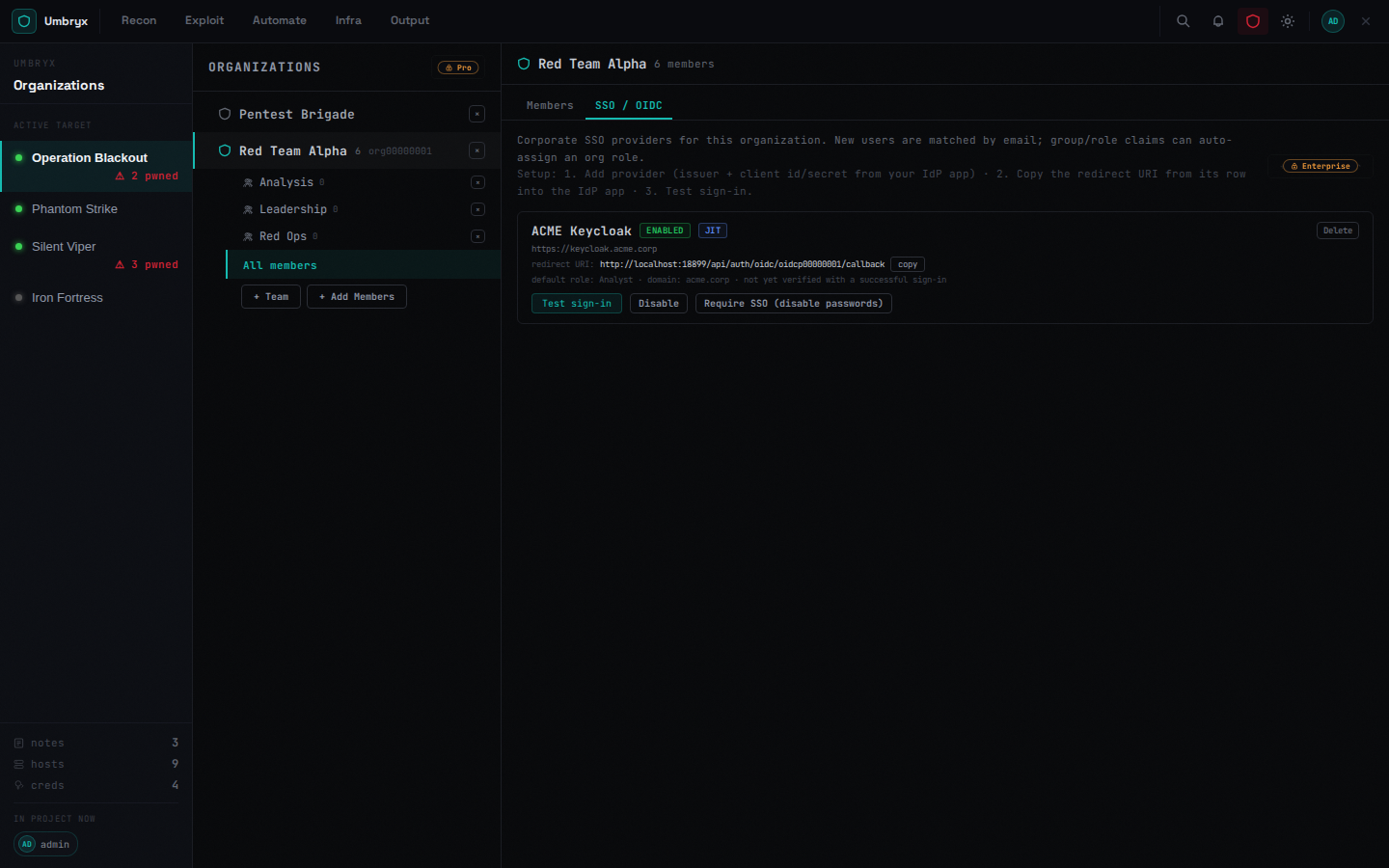
The dialog shows the Callback URL (with a copy button) under the Issuer field — it is final before you even save, and each provider row later carries the same URL plus a Test sign-in button that opens the real sign-in flow in a new tab (the row's last verified sign-in confirms a working round trip).
Fill in:
| Field | Notes |
|---|---|
| Display name | Shown on the login screen as "Sign in with {name}" |
| Issuer URL | e.g. https://your-org.okta.com — authorization/token/userinfo/JWKS endpoints are discovered automatically from {issuer}/.well-known/openid-configuration; you never enter them by hand |
| Client ID / Client secret | From §2. The secret is encrypted at rest and is never shown again after creation |
| Email domain | Optional — lets the login screen suggest this provider when someone types an @your-org.com email, before they've authenticated |
| Default role | Org role (viewer, analyst, operator, …) assigned to a user with no matching group mapping (§5) |
| JIT provisioning | See §4 |
| Require platform MFA | See §6 |
| Allow private issuer | Off by default — turn on only for a self-hosted IdP on an internal network (see below). Platform-admin only, even on the org-scoped form. |
Or via API:
curl -X POST https://umbryx.example.com/api/orgs/$ORG_ID/oidc-providers \
  -H "Content-Type: application/json" -b cookies.txt \
  -d '{
    "name": "Corp Okta",
    "issuer_url": "https://your-org.okta.com",
    "client_id": "0oa1b2c3d4e5",
    "client_secret": "...",
    "email_domain": "your-org.com",
    "default_role": "viewer",
    "jit_provisioning_enabled": true,
    "require_platform_mfa": false
  }'
Platform-wide equivalent (drop default_role/role_mapping, no $ORG_ID, needs a
platform_admin session):
curl -X POST https://umbryx.example.com/api/system/oidc-providers \
  -H "Content-Type: application/json" -b cookies.txt \
  -d '{
    "name": "Corp GitLab",
    "issuer_url": "https://gitlab.your-company.com",
    "client_id": "...",
    "client_secret": "...",
    "email_domain": "your-company.com",
    "jit_provisioning_enabled": true,
    "require_platform_mfa": false
  }'
If discovery fails (400 OIDC discovery failed: ...), double-check the issuer URL — it must be
the exact base your IdP's .well-known/openid-configuration document lives under, with no
trailing path segments. The issuer (and everything discovery finds — token/JWKS/userinfo
endpoints) is checked against the platform's SSRF guard; an issuer that resolves to a
private/internal address is rejected by default.
Self-hosted IdP on a private network: if your GitLab/Keycloak/etc. is only reachable via
internal DNS and resolves to an RFC1918 address (this is normal for an on-prem IdP behind a VPN or
office firewall), discovery fails with Target hostname resolves to private/internal address.
Set "allow_private_issuer": true in the create/update payload (or the checkbox in the UI form) to
opt this specific provider out of the SSRF guard. This is deliberately a narrow, per-provider
override rather than a global setting: an org admin choosing where the platform's outbound
requests go is exactly the trust boundary the guard exists for on a multi-tenant instance, so
setting it always requires a platform_admin session even when creating/updating an org-scoped
provider through /api/orgs/{org_id}/oidc-providers — an org owner/admin alone gets a 403 if
they try. Also check your DNS resolution path if discovery fails in an unexpected way even
after setting this: a container's outbound DNS resolver matters — if it's using public DNS while
your IdP's hostname is only resolvable (or resolves differently, e.g. via split-horizon DNS) on
your internal resolver, discovery can fail or silently hit the wrong host. docker-compose.yml's
backend.dns service takes DNS_SERVER_1/DNS_SERVER_2 env vars for exactly this — point them at
your internal resolver if requests need to reach split-horizon internal hostnames correctly.
The response includes the new provider's id. Now go back to your IdP (§2 step 4) and set the
real redirect URI:
4. New vs. existing users (JIT provisioning and account linking)¶
- JIT provisioning ON: a first-time sign-in from someone with no matching platform account
auto-creates one — global role is always
user(neverplatform_admin); org-scoped providers additionally join that org with a role from the group/role mapping (§5) ordefault_roleif unmapped/unmatched, while platform-wide providers join no org at all (see §0). The new account's username comes from the OIDC-standardpreferred_usernameclaim if the IdP sends one (GitLab, Keycloak, and Okta all do) — falling back to the email local-part only if it doesn't. This matters because two people whose email both start with the same local-part (e.g. twoadmin@addresses across different systems, or just common first-name collisions) would otherwise both fight over the same base username and get an arbitraryname2/name3suffix, even though the IdP already had a perfectly good, actually-unique handle. - JIT provisioning OFF: a first-time sign-in from someone with no matching account is
rejected ("no account found and self-signup is disabled") — use this if you want to
pre-provision accounts yourself (e.g. via
POST /api/orgs/{org_id}/users) and only let already- known people through SSO. - Existing account with the same email: never auto-linked, regardless of the JIT setting. The user is shown a confirmation screen and must enter that account's actual password once to link it — this is deliberate: without it, anyone who can get any email accepted as legitimate at a less-trusted IdP could otherwise take over an existing account by matching its email.
5. Mapping groups/roles to org roles (optional)¶
If your IdP sends a groups/roles claim (Keycloak: roles by default under a custom mapper; Azure
AD: groups — needs the Group Claims option turned on in the app registration; Okta: configure an
groups claim on the authorization server), you can map specific values to org roles so JIT-
provisioned (and newly linked) users land with the right permissions immediately:
{
  "claim_mapping": {"email": "email", "name": "name", "groups": "groups"},
  "role_mapping": {"platform-admins": "admin", "analysts": "analyst"},
  "default_role": "viewer"
}
claim_mapping only needs entries for claims your IdP names differently than the OIDC standard
(email, name, groups) — omit anything that already matches.
A group present in the token but not listed in role_mapping never grants anything beyond
default_role — there's no "give them something reasonable" fallback for unrecognized groups, by
design.
6. Platform MFA on top of OIDC¶
Corporate IdPs usually already enforce their own MFA — whether the platform's own TOTP-MFA is
also required after a successful OIDC sign-in is a per-provider toggle
(require_platform_mfa), not a global policy:
- Off (default): a valid OIDC sign-in is sufficient — the IdP is trusted to have done its own MFA.
- On: after OIDC succeeds, a user with platform MFA already enabled on their account
(
Settings → Security → Enable MFA) is sent through the normal/api/auth/mfa/verifystep before getting a session — same mechanism as password login's MFA step, not a separate one. A user who hasn't set up platform MFA yet is not blocked by this toggle — it only adds a second factor for accounts that already opted into one.
7. Testing before you rely on it¶
Just sign in through it once — from the login screen, either enter your @your-domain.com email
and click the suggested "Sign in with {name}" button, or navigate directly to
{PUBLIC_BASE_URL}/api/auth/oidc/{provider_id}/login. Any full successful round trip (any user,
not a special "test mode") records a verified timestamp on the provider — visible in the SSO/OIDC
admin tab as "last verified sign-in: ...".
This verified timestamp is a hard requirement for §8 — you cannot skip this step.
8. Making SSO mandatory ("obligatory OIDC")¶
Turning on Require SSO (disable passwords) for a provider rejects password login for every
member of that organization from then on (platform_admin accounts are always exempt, so the
platform itself can never be locked out).
The toggle is refused with a 400 until §7's verified sign-in has happened at least once through
that exact provider — this is intentional, not a bug: it stops a broken configuration (wrong
client secret, unreachable issuer, wrong redirect URI at the IdP) from locking out every org
member simultaneously the moment you flip the switch.
If you need to roll back — e.g. the IdP is down and nobody can sign in — turn the toggle back off via the API (or ask a platform admin, who can always reach the org regardless) to restore password login immediately:
curl -X PATCH https://umbryx.example.com/api/orgs/$ORG_ID/oidc-providers/$PROVIDER_ID \
  -H "Content-Type: application/json" -b cookies.txt \
  -d '{"enforced": false}'
Vendor-specific notes¶
| IdP | Issuer URL shape | Where to find it |
|---|---|---|
| Keycloak | https://{host}/realms/{realm} |
Realm settings → General → Endpoints → OpenID Endpoint Configuration (issuer is the base, strip /.well-known/...) |
| Okta | https://{your-org}.okta.com or https://{your-org}.okta.com/oauth2/{authServerId} if using a custom authorization server |
Security → API → Authorization Servers |
| Azure AD / Entra ID | https://login.microsoftonline.com/{tenant-id}/v2.0 |
App registration → Endpoints → OpenID Connect metadata document (issuer is the base) |
| Google Workspace | https://accounts.google.com |
Fixed, same for every Google Workspace tenant |
| GitLab (gitlab.com or self-hosted) | https://gitlab.example.com (self-hosted) or https://gitlab.com |
User Settings → Applications (or Admin Area → Applications for an instance-wide client) — create an application, grant it the openid, email, profile scopes, mark it Confidential. GitLab sends preferred_username as the actual GitLab login (see §4) and groups/groups_direct if you need role mapping. |
Group/role claims are the one thing that varies most:
- Keycloak: add a "Group Membership" or "User Realm Role" mapper to the client's dedicated
scope, name the claim
groups(or setclaim_mapping.groupsto whatever you name it). - Azure AD: App registration → Token configuration → Add groups claim. Azure sends group
object IDs, not names, by default — map those IDs in
role_mapping, or switch the claim to emit group display names if your tenant supports it. - Okta: Security → API → Authorization Servers → your server → Claims → add a
groupsclaim filtered to the groups you want to expose. - Google Workspace: group claims require the Cloud Identity/Admin SDK and aren't exposed via
plain OIDC scopes — role mapping is generally not practical with Google; use
default_roleand manage org roles manually instead.
Troubleshooting¶
| Symptom | Likely cause |
|---|---|
OIDC discovery failed on create/update |
Issuer URL wrong, or the IdP's discovery endpoint isn't reachable from the backend (check PUBLIC_BASE_URL/network egress — outbound requests go through the platform's SSRF guard, so a URL resolving to a private/internal address is rejected) |
Target hostname resolves to private/internal address |
The issuer (or a discovered endpoint) resolves to an RFC1918/loopback/link-local address — either it's genuinely a self-hosted internal IdP (set allow_private_issuer, see §3 — needs platform_admin) or the backend's DNS resolver is returning the wrong (public) address for a split-horizon hostname (check DNS_SERVER_1/DNS_SERVER_2) |
redirect_uri mismatch at the IdP, or callback lands on the wrong node in an HA deployment |
PUBLIC_BASE_URL isn't set identically on every app node — see §0b |
Login redirects back with oidc_error=... in the URL fragment |
The fragment message is human-readable; check the backend audit log (oidc.failed events) for the underlying reason (state_expired, state_cookie_mismatch, an IdP-side error, etc.) |
| "No account found and the organization does not allow self-signup" | JIT provisioning is off and no existing account matches the login's email — either enable JIT or pre-create the account |
| New JIT user has the wrong role | Check role_mapping against the actual claim value the IdP sends — log the raw claims once (temporarily) if unsure, since group claim values (especially Azure AD object IDs) rarely match what's shown in the IdP's admin UI |
| Can't enable "Require SSO" | Complete one successful sign-in through that exact provider first — this can't be skipped (§7/§8) |